Showing posts with label Web Service. Show all posts

Friday, July 29, 2011

How to test secure web services with soapUI - part #2


In  a previous article I described how to specify signature and encryption for outgoing Secured Web Services request.

1. SAML

In this second article I will talk about SAML and incoming Secure Web Service responses.

If you are using SAML 1.X then you just need to add a SAML 1.X assertion in the corresponding window.
You may have to add a timestamp as follow:


In this example, we specify 10,000 milliseconds (10 seconds) for the life time of the Timestamp:


SAML 1.X assertions are copied and pasted in the SAML tab:


Of course, if you combine signature and encryption with SAML 1.X. You can those to the configuration tabs as well.

For SAML 2.0, the only option you have for this version of soapUI is to add it manually to the WSSE section of your SOAP request:


2. Incoming Secure Web Service 
Responses


Setting up incoming secure Web services responses encrypted and/or signed is easier than for outgoing request:

1) Make sure that you have Keystores / Certificates tab set - You probably have done that earlier as described in part #1 of this article.
You verify the signature with public key contained in the server's sender certificate/store and your private key to decrypt what the other server sends you.


2) Create an incoming WSS configuration (e.g. my_config_from_server_A) that will decrypt the incoming SOAP requests coming from server A:


You specify that you want to use your keystore to decrypt the message and the server's certificate/store to verify the signature of server A
(theses should appear in the drop box for each field):


3) Last, you want to specify that you are using the incoming configuration for each request:


Enjoy!


Monday, June 27, 2011

Problem initializing the class javax.crypto.SunJCE_b with soapUI ?


Last week, I have decided to download and  install the lastest soapUI PRO version 4.0 from Eviware.
I have been using soapUI for some time to test secure SOAP Web services using SSL/TLS as well as encrypting and signing the SOAP payload.

However when I tried to use my existing projects I end-up with the following errors in my soapUI log:

Wed Jun 22 11:43:05 PDT 2011:ERROR:java.lang.NoClassDefFoundError: Could not initialize class javax.crypto.SunJCE_b
   java.lang.NoClassDefFoundError: Could not initialize class javax.crypto.SunJCE_b
    at javax.crypto.KeyGenerator.a(DashoA13*..)
    at javax.crypto.KeyGenerator.(DashoA13*..)
    at javax.crypto.KeyGenerator.getInstance(DashoA13*..)
    at org.apache.ws.security.message.WSSecEncrypt.getKeyGenerator(WSSecEncrypt.java:701)
    at org.apache.ws.security.message.WSSecEncrypt.prepare(WSSecEncrypt.java:228)
    at org.apache.ws.security.message.WSSecEncrypt.build(WSSecEncrypt.java:291)
    at com.eviware.soapui.impl.wsdl.support.wss.entries.AddEncryptionEntry.process(AddEncryptionEntry.java:311)
    at com.eviware.soapui.impl.wsdl.support.wss.OutgoingWss.processOutgoing(OutgoingWss.java:157)
    at com.eviware.soapui.impl.wsdl.submit.filters.WssRequestFilter.filterWsdlRequest(WssRequestFilter.java:58)
    at com.eviware.soapui.impl.wsdl.submit.filters.AbstractRequestFilter.filterAbstractHttpRequest(AbstractRequestFilter.java:37)
    at com.eviware.soapui.impl.wsdl.submit.filters.AbstractRequestFilter.filterRequest(AbstractRequestFilter.java:31)
    at com.eviware.soapui.impl.wsdl.submit.transports.http.HttpClientRequestTransport.sendRequest(HttpClientRequestTransport.java:133)
    at com.eviware.soapui.impl.wsdl.WsdlSubmit.run(WsdlSubmit.java:123)
    at java.util.concurrent.Executors$RunnableAdapter.call(Unknown Source)
    at java.util.concurrent.FutureTask$Sync.innerRun(Unknown Source)
    at java.util.concurrent.FutureTask.run(Unknown Source)
    at java.util.concurrent.ThreadPoolExecutor$Worker.runTask(Unknown Source)
    at java.util.concurrent.ThreadPoolExecutor$Worker.run(Unknown Source)
    at java.lang.Thread.run(Unknown Source)


A quick search on the web told me to check if my some of my security setup in my JRE was properly configured.
For this it was recommended to check the security directory under the lib folder (.\Java\jre6\lib\security):


I also checked the content of the content of the jar file ./Java/jre6/lib/jce.jar which should contain the missing class in question:  javax.crypto.SunJCE_b

However everything looked fine. Even though my JRE was almost up-to-date, I finally managed to fix this issue by upgrading my java JRE to the latest version!


Friday, April 16, 2010

SOA and Health Care Meaningful Use requirements of the Recovery Act


The Interim Final Rule of the Health Information Technology for Economic and Clinical Health (HITECH) Act was passed by Congress in February of 2009.  Under this act, eligible providers will be given financial rewards if they demonstrate "meaningful use" of "certified" Electronic Health Record (EHR) technologies.

Therefore there is a big incentive for health care vendors to offer solutions that meet the criteria described in the law.  More precisely, the associated regulation provided by the Department of Health and Human Services describes the set of standards,  implementation, specifications and certification for Electronic Health Record (EHR) technology.


As a Software Architect, I was curious to see whether Service Oriented Architecture (SOA) or Web Services in general were mentioned in these documents.

The definition of an EHR Module includes an open list of services such as electronic health information exchange, clinical decision support, public health and health authorities information queries, quality measure reporting etc.

In the transport standards section, both SOAP and RESTful Web services protocols are described. However Service Oriented Architecture (SOA) is never explicitly described or cited. No reference how these services might be discovered and orchestrated in a "meaningful way". I would assume that the reason is that the law makers and regulators wanted to be as vague as possible on the underlying technologies for an EHR and its components.

The technical aspect of "meaningful use" is specified more precisely when associated with interoperability, functionality, utility, data confidentiality and integrity of the data, security of the health information system in general.

These characteristics are not necessarily specific to SOA, but to any good health care software and solution design.

Still, the following paragraph seems to describe a solution that could be best implemented using a Service Oriented Architecture: "As another example, a subscription to an application service provider (ASP) for electronic prescribing could be an EHR Module"  where software is offered as a service (SaaS).  This looks more like the description of an emerging SOA rather than a full grid enabled SOA.

It will be up to the solutions providers to come up with relevant products and tools to maximize the return on investment (ROI) of the tax payer's money and the professionals and organizations eligible for ARRA/HITECH.

SOA will definitively be part of the mix since it gives the ability create, offer and maintain large numbers of complex EHR Software solutions (SaaS) that have a high level of modularization and interoperability.
 
Further developments toward a complete SOA stack such as offering a Platform as a Service (PaaS) and even the underlying Infrastructure as a Service (IaaS) in the cloud will face more resistance in a domain known for a lot of legacy systems and concerns about privacy and security.

The Object Management Group (OMG) is organizing a conference this summer on the topic of  "SOA in Healthcare: Improving Health through Technology: The role of SOA on the path to meaningful use". It will be interesting to see what healthcare providers, payers, public health organizations and solution providers from both the public and private sector will have to say on this topic.

Wednesday, January 7, 2009

Flex Web Service Introspection Wizard and BlazeDS

In my previous post, I mentioned that if you want to fully use Flex 3.0 Web Service introspection wizard, you will need to either use Adobe LifeCycle Data service, or have a cross domain file installed on the server that expose the web services you want to use.

However, if you use only BlazeDS, the web service wizard can still be useful to better understand which type of objects you obtain when calling 3rd party web services (besides looking at the wsdl file and debugging ResultEvent.result content).

In this post I will describe how to use Flex Builder 3.0 to introspect the ICW LifeSensor Web Service API. Then I will build a small Flex based portlet to display information related to a patient who has his medical information stored in the LifeSensor Personal Health Record (PHR).

A. Introspecting the Web Services

For this, you will need to know the WSDL URL of your web services.

In the case of LifeSensor, I am accessing the WSDL file over HTTPS which is protected with a login and password but you can also test the intropection wizard with free available web services available on the internet.

From Flex builder (I am using Flex Eclipse plugin), select "Data/Import Web Service (WSDL)...":
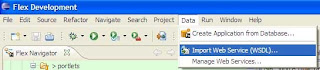


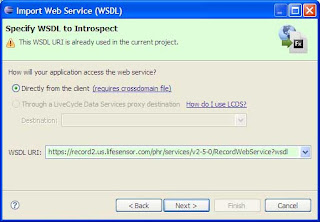
Then select the folder you want to import your classes to, click next, then enter the WSDL URL and click next again:


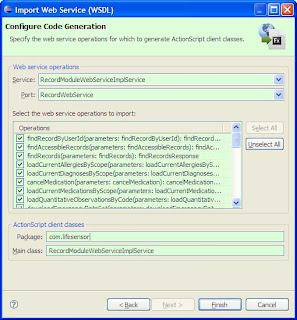
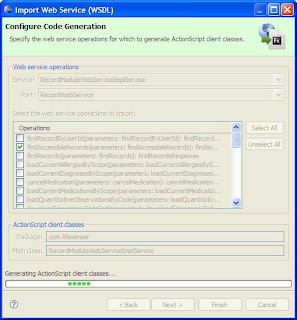
First you select the list of the operations you want to import. In my case, I just want to import the operation findAccessibleRecords.

You can also change the default value of the packages for the classes that are going to be generated and the main class name.

In my case, I just kept the default values, respectively com.lifesensor and RecordModuleWebServiceImplService.


It just takes few seconds to generate the proxy classes:


Even though I am importing only one operation from LifeSensor, a little bit more than 80 classes are generated.
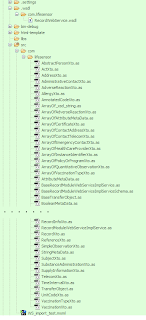


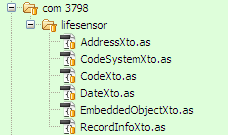
RecordInfoXto
and its dependent classes structure is very close to the object returned by the web service call. Therefore I will be using only the following files:
  • AddressXto.as
  • CodeSystemXto.as
  • CodeXto.as
  • DateXto.as
  • EmbeddedObjectXto.as
  • RecordInfoXto.as


/**
 * RecordInfoXto.as
 * This file was auto-generated from WSDL by the Apache Axis2 generator modified by Adobe
 * Any change made to this file will be overwritten when the code is re-generated.
 */

package com.lifesensor
{
    import mx.utils.ObjectProxy;
    import flash.utils.ByteArray;
    import mx.rpc.soap.types.*;
    /**
     * Wrapper class for a operation required type
     */
   
    public class RecordInfoXto extends com.lifesensor.EmbeddedObjectXto
    {
        /**
         * Constructor, initializes the type class
         */
        public function RecordInfoXto() {}
           
        public var academicTitle:String;
        public var address:com.lifesensor.AddressXto;
        public var birthDate:com.lifesensor.DateXto;
        public var birthPlace:String;
        public var familyName:String;
        public var gender:com.lifesensor.CodeXto;
        public var givenName:String;
        public var middleName:String;
        public var scope:String;
        public var subjectId:String;
    }
}
   public class AddressXto extends com.lifesensor.EmbeddedObjectXto {
  /**
   * Constructor, initializes the type class
   */
  public function AddressXto() {}
          
  public var city:String;
  public var corpus:String;
  public var country:com.lifesensor.CodeXto;
  public var flat:String;
  public var line1:String;
  public var line2:String;
  public var organization:String;
  public var postalCode:String;
  public var state:com.lifesensor.CodeXto;
  public var streetAddressLine:String;
  public var zipCodeExtension:String;
 }

        public class CodeXto extends com.lifesensor.CodeSystemXto
 {
  /**
   * Constructor, initializes the type class
   */
  public function CodeXto() {}
          
  public var key:String;
 }

 public class DateXto extends com.lifesensor.EmbeddedObjectXto
 {
  /**
   * Constructor, initializes the type class
   */
  public function DateXto() {}
          
  public var isoDate:String;
 }

B. Creating the Flex component using BlazeDS

In a previous post, I have described in details how to create a BlazeDS application that uses BlazeDS to access web services. This one is very similar.

The proxy-config.xml describes the web service end-points and channel:

<destination id="ws-lifesensor-record">
        <properties>
            <wsdl>https://record2.us.lifesensor.com/phr/services/v2-5-0/RecordWebService?wsdl</wsdl>
            <remote-username>????????</remote-username>
            <remote-password>????????</remote-password>
            <soap>https://record2.us.lifesensor.com/phr/services/v2-5-0/RecordWebService</soap>
        </properties>
        <adapter ref="soap-proxy"/>
    </destination>


First, I import the generated classes. Then populating the RecordInfoXto object is straightforward:
import com.lifesensor.*;

private function findAccessibleRecords_result(event:ResultEvent):void {

  if (event.result != null) {
    var all_records:ArrayCollection = event.result as ArrayCollection;
    var record:Object = all_records.getItemAt(0);
                    
    // State
    var state:CodeXto = new CodeXto();
    state.key = record.address.state.key;
                    
    // Country
    var country:CodeXto = new CodeXto();
    country.key = record.address.country.key;
                    
    // Address
    var address:AddressXto = new AddressXto();
    address.streetAddressLine = record.address.streetAddressLine;
    address.city = record.address.city;
    address.postalCode = record.address.postalCode;
    address.state = state;
    address.country = country;
                    
    // Gender
    var gender:CodeXto = new CodeXto();
    gender.key = record.gender.key;

    // Birth Date
    var date:DateXto = new DateXto();
    date.isoDate = record.birthDate.isoDate;
                    
    // Record 
    patient_record = new RecordInfoXto();
    patient_record.givenName = record.givenName;
    patient_record.familyName = record.familyName;
    patient_record.gender = gender;
    patient_record.address = address;
    patient_record.birthDate = date;
    }
}

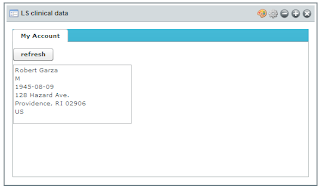
The resulting Flex based portlet is very simple (with a very compact code):
Friday, November 7, 2008

How to use BlazeDS for Web Service access

I was recently asked to investigate how quickly aggregate medical content from various sources in a portal environment. One path I explored was to use Adobe Flex as front-end technology and access remote web services such as the ones offered by ICW LifeSensor.

With Flex 3.0 you can easily use a Web Service directly from your MXML or ActionScript code, including .NET based web services.

However there are some restrictions. For security reasons, applications running in Flash Player on client computers can only access remote data sources if one of the following conditions is met:
  • Your SWF file is in the same domain as the remote data source.
  • A cross-domain policy file is installed on the web server hosting the data source.
  • You use a proxy and your SWF file is on the same server as the proxy.
Since the Web services I want to use are not under my control and I know they do not have a cross-domain policy files installed, the only solution left is for me to use a proxy.

The good news is that BlazeDS, in addition to add RPC capabilities to Flex, acts as a Proxy, so won't have to write my own!


Installing and trying BlazeDS
BlazeDS is really easy to install. I choose to download the turnkey version to start because it includes a runtime environment (Apache Tomcat) and lot of samples.


After download and unzip, the only things I had to do was to start the database for the samples (Hypersonic/HSQLDB) and start tomcat and point to http://localhost:8400/samples/. The "Take the test drive" of the tutorial contains a section (sample 2) using web services. The sample code is accessible in .\blazeds_turnkey_3-0-0-544\tomcat\webapps\samples\testdrive-webservice\src\main.mxml:

     <mx:Application xmlns:mx="http://www.adobe.com/2006/mxml"   backgroundColor="#FFFFFF">
 
       <mx:WebService id="srv" destination="ws-catalog" useProxy="true" showBusyCursor="true"/>
 
        <mx:DataGrid dataProvider="{srv.getProducts.lastResult}" width="100%" height="100%">
          <mx:columns>
                  <mx:DataGridColumn dataField="productId" headerText="Product Id"/>
                  <mx:DataGridColumn dataField="name" headerText="Name"/>
                  <mx:DataGridColumn dataField="price" headerText="Price"/>
           </mx:columns>
       </mx:DataGrid>
 
       <mx:Button label="Get Data" click="srv.getProducts()"/>
 
   </mx:Application>
The destination of the web service is defined in .\samples\WEB-INF\flex\proxy-config.xml:

   <destination id="ws-catalog">
       <properties>
           <wsdl>http://livecycledata.org/services/ProductWS?wsdl</wsdl>
           <soap>*</soap>
       </properties>
       <adapter ref="soap-proxy"/>
   </destination>

Installing and trying BlazeDS

The next step for me was to try to build a new Flex application from scratch
that uses a web service from an outside domain.
I decided to use one of my favorite free testing Web service,
the "CDS - Centre de Données astronomiques de Strasbourg"
located in Alsace, France which provides access to Astronomical data,
including Messier Objects.

Sesame is one of the apache axis based services hosted by CDS.
In the same way, this new service is declared in the proxy-config.xml file:

      <destination id="ws-sesame">
        <properties>
            <wsdl>http://cdsws.u-strasbg.fr/axis/services/Sesame?wsdl</wsdl>
            <soap>*</soap>
        </properties>
        <adapter ref="soap-proxy"/>
    </destination>

The Flex program is very easy to construct.
I have a list of Messier Objects in a combo box with their IDs (Mxxxx)
that are passed as argument for the SesameXML web service operation (see WDSL file).
The web service call indicated that BlazeDS is used as as proxy (useProxy="true")
and define two ActionScripts methods to handle the result coming back
from the remote service and to handle any error (respectively  getData_result and getData_fault).

<?xml version="1.0" encoding="utf-8"?>
<mx:Application xmlns:mx="http://www.adobe.com/2006/mxml" layout="absolute">
    <mx:Script>
        <![CDATA[
            import mx.controls.Alert;
            import mx.rpc.events.ResultEvent;
            import mx.rpc.events.FaultEvent;
   import mx.utils.ObjectUtil;            
            // This software uses source code created at the Centre de Données astronomiques de Strasbourg, France.
            private function getData():void { webService.SesameXML.send();}
            private function getData_result(evt:ResultEvent):void {textArea.text = ObjectUtil.toString(evt.result);}
            private function getData_fault(evt:FaultEvent):void {Alert.show(evt.type);}
        ]]>
    </mx:Script>
    
    <mx:WebService id="webService" destination="ws-sesame" useProxy="true">
        <mx:operation name="SesameXML"
                resultFormat="object"
                result="getData_result(event);"
                fault="getData_fault(event);"> 
                <mx:request>
    <name>{messier_object.selectedItem.data}</name>
  </mx:request>
        </mx:operation>
    </mx:WebService>
 <mx:ApplicationControlBar dock="true">
        <mx:Button id="button" label="get Messier Data" click="getData();" />
        <mx:Spacer width="10%"/>
        <mx:ComboBox id="messier_object" width="200">
            <mx:dataProvider>
               <mx:ArrayCollection>
                  <mx:source>
                    <mx:Object label="Crab Nebula" data="M1"/>
                    <mx:Object label="Butterfly Cluster" data="M6"/>
                    <mx:Object label="Butterfly Cluster" data="M6"/>
                    <mx:Object label="Ptolemy Cluster" data="M7"/>
                    <mx:Object label="Lagoon Nebula" data="M8"/>
                    <mx:Object label="Wild Duck Cluster" data="M11"/>
                    <mx:Object label="Great Globular Cluster in Hercules" data="M13"/>
                    <mx:Object label="Eagle Nebula" data="M16"/> 
                    <mx:Object label="Omega Nebula" data="M17"/> 
                    <mx:Object label="Trifid Nebula" data="M20"/> 
                    <mx:Object label="Sagittarius Cluster" data="M22"/> 
                    <mx:Object label="Sagittarius Star Cloud" data="M24"/> 
                  </mx:source>
                </mx:ArrayCollection>
            </mx:dataProvider>
           </mx:ComboBox>
    </mx:ApplicationControlBar>
    <mx:TextArea id="textArea" editable="false" width="100%" height="100%" />
 
</mx:Application>
Building the SWF file

To build your shockwave executable file, it is important to indicate where the services
configuration file is located, so the BlazeDS stub is added to the *.SWF file
running in the browser inside the Flash Player and will make the connection
of the BlazeDS proxy.

   mxmlc -strict=true \
-show-actionscript-warnings=true \
-use-network=true \
-services=WEB-INF/flex/services-config.xml \
-context-root=samples \
-output=testdrive-webservice/main.swf testdrive-webservice/src/main.mxm
In fact, services-config.xml describes the different services that the web application is using:
 <services-config>
    <services>
        <service-include file-path="proxy-config.xml" />
        ...
   </services>
   ....
 </services-config>
You will also need to modify your ./docroot/WEB-INF/web.xml file by adding the definitions of the listener and the MessageBroker Servlet definition.
<web-app>
    <display-name>WebTest</display-name>
    <description>Application with Samples</description>

    <context-param>
        <param-name>flex.class.path</param-name>
        <param-value>/WEB-INF/flex/hotfixes</param-value>
    </context-param>

    <!-- Http Flex Session attribute and binding listener support -->
    <listener>
        <listener-class>flex.messaging.HttpFlexSession</listener-class>
    </listener>

    <!-- MessageBroker Servlet -->
    <servlet>
        <servlet-name>MessageBrokerServlet</servlet-name>
        <display-name>MessageBrokerServlet</display-name>
        <servlet-class>flex.messaging.MessageBrokerServlet</servlet-class>
        <init-param>
            <param-name>services.configuration.file</param-name>
            <param-value>/WEB-INF/flex/services-config.xml</param-value>
        </init-param>
        <load-on-startup>1</load-on-startup>
    </servlet>
    <servlet-mapping>
        <servlet-name>MessageBrokerServlet</servlet-name>
        <url-pattern>/messagebroker/*</url-pattern>
    </servlet-mapping>
 
</web-app>
Here is the result after querying information about Messier object (M1 - Crab Nebula):
The next task for me to see how to integrate BlazeDS in a portal environment
such as Liferay and explore authentication to Web Services and security features associated
to the use of BlazeDS.