In my previous post, I mentioned that if you want to fully use Flex 3.0 Web Service introspection wizard, you will need to either use Adobe LifeCycle Data service, or have a cross domain file installed on the server that expose the web services you want to use.
However, if you use only BlazeDS, the web service wizard can still be useful to better understand which type of objects you obtain when calling 3rd party web services (besides looking at the wsdl file and debugging ResultEvent.result content).
In this post I will describe how to use Flex Builder 3.0 to introspect the ICW LifeSensor Web Service API. Then I will build a small Flex based portlet to display information related to a patient who has his medical information stored in the LifeSensor Personal Health Record (PHR).
A. Introspecting the Web Services
For this, you will need to know the WSDL URL of your web services.
In the case of LifeSensor, I am accessing the WSDL file over HTTPS which is protected with a login and password but you can also test the intropection wizard with free available web services available on the internet.
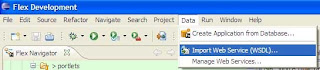
From Flex builder (I am using Flex Eclipse plugin), select "Data/Import Web Service (WSDL)...":
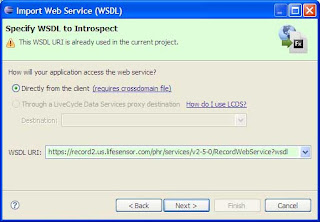
Then select the folder you want to import your classes to, click next, then enter the WSDL URL and click next again:
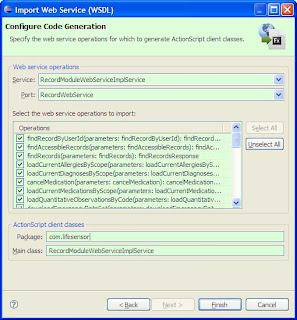
First you select the list of the operations you want to import. In my case, I just want to import the operation findAccessibleRecords.
You can also change the default value of the packages for the classes that are going to be generated and the main class name.
In my case, I just kept the default values, respectively com.lifesensor and RecordModuleWebServiceImplService.
It just takes few seconds to generate the proxy classes:
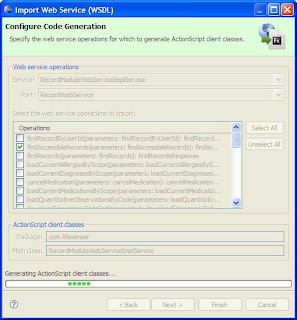
Even though I am importing only one operation from LifeSensor, a little bit more than 80 classes are generated.
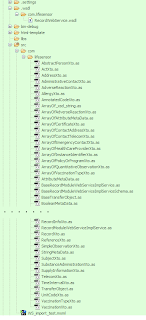
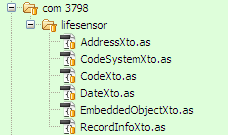
RecordInfoXto and its dependent classes structure is very close to the object returned by the web service call. Therefore I will be using only the following files:
B. Creating the Flex component using BlazeDS
In a previous post, I have described in details how to create a BlazeDS application that uses BlazeDS to access web services. This one is very similar.
The proxy-config.xml describes the web service end-points and channel:
First, I import the generated classes. Then populating the RecordInfoXto object is straightforward:
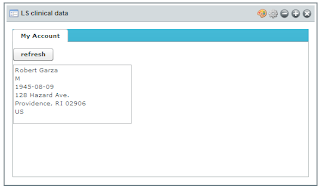
The resulting Flex based portlet is very simple (with a very compact code):
However, if you use only BlazeDS, the web service wizard can still be useful to better understand which type of objects you obtain when calling 3rd party web services (besides looking at the wsdl file and debugging ResultEvent.result content).
In this post I will describe how to use Flex Builder 3.0 to introspect the ICW LifeSensor Web Service API. Then I will build a small Flex based portlet to display information related to a patient who has his medical information stored in the LifeSensor Personal Health Record (PHR).
A. Introspecting the Web Services
For this, you will need to know the WSDL URL of your web services.
In the case of LifeSensor, I am accessing the WSDL file over HTTPS which is protected with a login and password but you can also test the intropection wizard with free available web services available on the internet.
From Flex builder (I am using Flex Eclipse plugin), select "Data/Import Web Service (WSDL)...":

Then select the folder you want to import your classes to, click next, then enter the WSDL URL and click next again:

First you select the list of the operations you want to import. In my case, I just want to import the operation findAccessibleRecords.
You can also change the default value of the packages for the classes that are going to be generated and the main class name.
In my case, I just kept the default values, respectively com.lifesensor and RecordModuleWebServiceImplService.

It just takes few seconds to generate the proxy classes:

Even though I am importing only one operation from LifeSensor, a little bit more than 80 classes are generated.

RecordInfoXto and its dependent classes structure is very close to the object returned by the web service call. Therefore I will be using only the following files:
- AddressXto.as
- CodeSystemXto.as
- CodeXto.as
- DateXto.as
- EmbeddedObjectXto.as
- RecordInfoXto.as

/**
 * RecordInfoXto.as
 * This file was auto-generated from WSDL by the Apache Axis2 generator modified by Adobe
 * Any change made to this file will be overwritten when the code is re-generated.
 */

package com.lifesensor
{
    import mx.utils.ObjectProxy;
    import flash.utils.ByteArray;
    import mx.rpc.soap.types.*;
    /**
     * Wrapper class for a operation required type
     */

    public class RecordInfoXto extends com.lifesensor.EmbeddedObjectXto
    {
        /**
         * Constructor, initializes the type class
         */
        public function RecordInfoXto() {}

        public var academicTitle:String;
        public var address:com.lifesensor.AddressXto;
        public var birthDate:com.lifesensor.DateXto;
        public var birthPlace:String;
        public var familyName:String;
        public var gender:com.lifesensor.CodeXto;
        public var givenName:String;
        public var middleName:String;
        public var scope:String;
        public var subjectId:String;
    }
}
   public class AddressXto extends com.lifesensor.EmbeddedObjectXto {
  /**
   * Constructor, initializes the type class
   */
  public function AddressXto() {}

  public var city:String;
  public var corpus:String;
  public var country:com.lifesensor.CodeXto;
  public var flat:String;
  public var line1:String;
  public var line2:String;
  public var organization:String;
  public var postalCode:String;
  public var state:com.lifesensor.CodeXto;
  public var streetAddressLine:String;
  public var zipCodeExtension:String;
 }

        public class CodeXto extends com.lifesensor.CodeSystemXto
 {
  /**
   * Constructor, initializes the type class
   */
  public function CodeXto() {}

  public var key:String;
 }

 public class DateXto extends com.lifesensor.EmbeddedObjectXto
 {
  /**
   * Constructor, initializes the type class
   */
  public function DateXto() {}

  public var isoDate:String;
 }
B. Creating the Flex component using BlazeDS
In a previous post, I have described in details how to create a BlazeDS application that uses BlazeDS to access web services. This one is very similar.
The proxy-config.xml describes the web service end-points and channel:
<destination id="ws-lifesensor-record">
        <properties>
            <wsdl>https://record2.us.lifesensor.com/phr/services/v2-5-0/RecordWebService?wsdl</wsdl>
            <remote-username>????????</remote-username>
            <remote-password>????????</remote-password>
            <soap>https://record2.us.lifesensor.com/phr/services/v2-5-0/RecordWebService</soap>
        </properties>
        <adapter ref="soap-proxy"/>
    </destination>
First, I import the generated classes. Then populating the RecordInfoXto object is straightforward:
import com.lifesensor.*;

private function findAccessibleRecords_result(event:ResultEvent):void {

  if (event.result != null) {
    var all_records:ArrayCollection = event.result as ArrayCollection;
    var record:Object = all_records.getItemAt(0);

    // State
    var state:CodeXto = new CodeXto();
    state.key = record.address.state.key;

    // Country
    var country:CodeXto = new CodeXto();
    country.key = record.address.country.key;

    // Address
    var address:AddressXto = new AddressXto();
    address.streetAddressLine = record.address.streetAddressLine;
    address.city = record.address.city;
    address.postalCode = record.address.postalCode;
    address.state = state;
    address.country = country;

    // Gender
    var gender:CodeXto = new CodeXto();
    gender.key = record.gender.key;

    // Birth Date
    var date:DateXto = new DateXto();
    date.isoDate = record.birthDate.isoDate;

    // Record
    patient_record = new RecordInfoXto();
    patient_record.givenName = record.givenName;
    patient_record.familyName = record.familyName;
    patient_record.gender = gender;
    patient_record.address = address;
    patient_record.birthDate = date;
    }
}
The resulting Flex based portlet is very simple (with a very compact code):


